What Is a Website Data Scraper?
A website data scraper is a tool or program designed to extract information from web pages. The goal is usually specific data. For example, imagine an e-commerce product page containing:
Product name
Price
SKU
Category
Available sizes
Product description
Rating
A scraper might be configured to extract only:
Product: Trail Runner Pro
Price: $149
SKU: TRP-001
Sizes: 7, 8, 9, 10, 11
It can then save that information in a structured format such as JSON, CSV or a database. Scrapy, one of the established web scraping frameworks, describes scraping as extracting structured data from web pages. Its selectors can target specific HTML elements using CSS selectors or XPath expressions. That structured extraction is one of the main strengths of scraping. You know what information you want, and the scraper is designed to retrieve it.
What Is an AI Website Crawler?
A website crawler starts with one or more URLs and discovers additional pages by following links. Imagine giving the crawler yourstore.com.It may discover:
yourstore.com/products
yourstore.com/products/trail-runner
yourstore.com/shipping
yourstore.com/returns
yourstore.com/faq
The crawler's first responsibility is discovering and visiting those pages. Google describes crawling as using automated software to discover new pages and understand what is available on the web.
AI chatbot crawlers use the same broad discovery concept but for a different purpose. Instead of building a search-engine index, they may use the discovered content to build a business knowledge base.
Amazon Bedrock's Web Crawler, for example, can begin with seed URLs or sitemaps, follow child links, restrict crawl depth and scope, apply URL inclusion or exclusion patterns and synchronize changed content into a knowledge base. That is much closer to what a business chatbot needs.
Web Crawling and Web Scraping Are Not Opposites
This is where most explanations become unnecessarily confusing. A crawler and scraper are often presented as competing technologies. Technically, they perform different parts of the process.
Scrapy itself supports both. Its documentation describes the framework as being used to crawl websites and extract structured data from the pages it visits. Its spiders define both how links should be followed and what information should be extracted. Think about it this way:
Crawler: “Which pages should I visit?”
Scraper: “What information should I take from this page?”
For an AI chatbot:
Crawler: discovers your pricing page.
Scraper or content extractor: extracts the pricing information.
Knowledge pipeline: organizes the information.
Retrieval system: finds that pricing information when a customer asks about cost.
AI model: turns it into a natural answer.
That complete pipeline matters more than the terminology.
Website Data Scraper vs AI Website Crawler: Quick Comparison
The important point is that one does not always replace the other. A sophisticated AI crawler may include scraping or extraction internally.
When a Website Data Scraper Makes More Sense
A website data scraper becomes particularly useful when you know exactly what information you want.
Product Catalogues
Suppose an ecommerce store contains 10,000 products. For each one, you want:
Product ID
Name
Price
Brand
Size
Colour
Category
Technical specification
This is a structured data problem. A scraper can extract those fields into predictable records. That can be useful when the chatbot needs to compare products or when the data will also be used by analytics, search or recommendation systems.
Pricing Data
A SaaS website might have multiple plans containing:
Monthly price
Annual price
User limits
Storage limits
Included features
A scraper can extract these fields into structured records. Instead of storing a complete pricing page as one block of text, you could represent the information as:
Plan: Growth
Monthly price: $99
Users: 15
Storage: 100 GB
That can make certain types of comparison easier.
Tables and Listings
Scrapers are also useful when websites contain repetitive structured elements such as:
Property listings
Course catalogues
Job listings
Product specifications
Location directories
Service tables
The extraction process can transform those repeated HTML structures into machine-readable records.
When an AI Website Crawler Makes More Sense
A crawler is usually the stronger starting point when you want the chatbot to understand a broad section of your own website rather than extract only a few predefined fields. Imagine your website contains:
30 service pages
50 FAQs
20 policy pages
300 product pages
100 support articles
You may not want to manually provide every URL. An AI website crawler can start at the main domain or sitemap and discover relevant pages automatically. Amazon Bedrock's crawler, for example, supports multiple starting URLs, sitemap sources, crawl depth controls, same-host or subdomain scopes, and include/exclude rules. For a chatbot knowledge base, that can reduce a large amount of manual setup.
The Biggest Difference Is the Intended Output
This distinction matters more than the name of the tool.
A scraper usually asks: “How do I turn this web page into structured data?”
A chatbot crawler asks: “How do I turn this website into useful knowledge that can later answer questions?”
Those goals lead to different processing decisions. Suppose a return-policy page says: Sale items can be returned within 14 days provided the product is unused and remains in its original packaging. A scraper could extract:
Return period: 14 days
Applies to: Sale items
Condition: Unused
Packaging: Original
That is useful structured information. An AI crawler and knowledge pipeline may instead preserve the paragraph as contextual knowledge. Later, when a customer asks: “I bought something on sale and opened the box. Can I return it?” the retrieval system can find the policy section and provide it to the AI model. Different representation. Different objective.
How an AI Chatbot Can Use Both
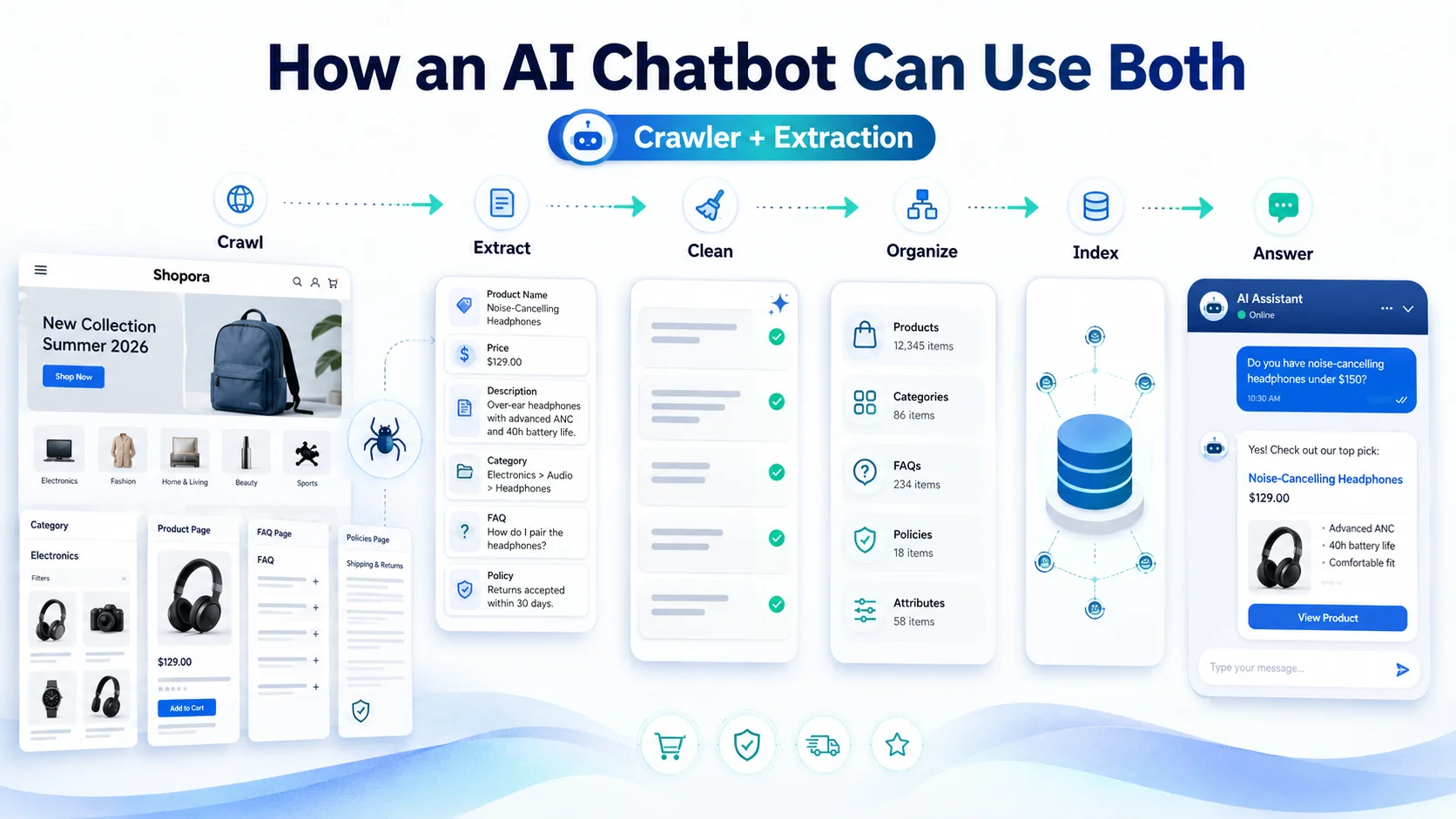
For many serious chatbot implementations, the most effective answer is not scraper or crawler. It is crawler plus extraction. Consider an ecommerce website.
Stage 1: Crawl the Store
The crawler discovers:
Product pages
Categories
FAQs
Shipping page
Returns page
Warranty information
Stage 2: Extract Useful Content
From product pages, the system may extract:
Name
Description
Price
Features
Compatibility
Variants
From policies, it may extract meaningful text sections.
Stage 3: Remove Noise
Navigation, repeated footers, cookie notices and irrelevant page elements can be removed.
Stage 4: Organize the Knowledge
Large pages may be divided into smaller sections or chunks. Relevant metadata can be added.
Stage 5: Index the Content
The content can be placed into a search or vector index. Modern AI search systems commonly combine vector retrieval with traditional text search. Microsoft Azure AI Search, for example, supports hybrid retrieval that runs full-text and vector queries together and combines the results for improved relevance.
Stage 6: Answer Customer Questions
The visitor asks: “Which waterproof shoes can I return if the size is wrong?” The system may need:
Product information
Feature information
Return-policy information
The retrieval layer finds those sources, and the AI creates the final response. That is much more sophisticated than simply scraping text from a page.
Why Scraped Data Alone Is Not Automatically Chatbot Knowledge
Suppose you scrape 50,000 product records into a CSV file. You now have data. That does not automatically mean your chatbot can answer useful questions from it. You still need a way to:
Store the information
Search it
Match questions with relevant records
Handle natural-language variations
Preserve context
Rank useful results
Send those results to the AI model
This is where chatbot knowledge architecture becomes important. A website scraper solves the data acquisition problem. It does not necessarily solve the retrieval and conversation problem.
Why Crawled Content Alone Is Also Not Enough
The reverse is also true. Imagine your crawler discovers 5,000 pages and reports: 5,000 URLs successfully crawled. That sounds impressive. But what if 2,000 are tag archives? Another 800 are outdated campaign pages. Hundreds contain duplicate content. And your important technical documentation is missing.
The crawl technically succeeded. The chatbot knowledge base did not. A good AI crawling workflow therefore needs:
Crawl scope
URL filters
Content extraction
Duplicate handling
Knowledge organization
Freshness controls
Retrieval testing
AWS's current crawler provides scope controls, rate limits, inclusion and exclusion patterns and incremental synchronization precisely because indiscriminately crawling everything is not always desirable.
Structured Data vs Unstructured Knowledge
This is one of the easiest ways to decide which approach you need.
Structured Data
Structured data fits into predictable fields. For example:
A website data scraper is very useful here. You know what each field means.
Unstructured Knowledge
Unstructured information appears as natural text. For example: International orders can be returned within 30 days. Customers are responsible for return shipping unless the product arrived damaged.
This is better suited to knowledge retrieval and RAG-style chatbot systems. Your business website probably contains both. That is why an effective AI knowledge pipeline may use different extraction methods for different page types.
Example: Ecommerce Store
Imagine a store selling laptops. A product page contains:
Model: NovaBook Pro
Price: $1,299
RAM: 16 GB
Storage: 512 GB
Screen: 14 inch
A website data scraper can extract those specifications cleanly. Now consider the store's warranty page: The standard warranty covers manufacturing defects for 12 months but excludes accidental damage and unauthorized modifications.
That information is less naturally represented as a few simple fields. A crawler can ingest the warranty page into the knowledge base. Then a shopper asks: “Does the NovaBook Pro have 16 GB RAM, and would the warranty cover it if I drop it?”
The chatbot needs both forms of knowledge. It needs structured product information and contextual warranty information. This example shows why scraping and crawling can complement one another.
Example: SaaS Website
Consider a SaaS company. Its pricing page contains:
A scraper can extract this precisely. But its documentation contains dozens of guides explaining setup, integrations, permissions and troubleshooting. A crawler is more appropriate for discovering and ingesting that broader knowledge. Now someone asks: “We're a team of eight and need Shopify integration. Would Growth work for us?”
The chatbot may need to combine:
User limits from structured pricing data
Shopify integration information from documentation
Again, using both approaches can produce the better answer.
Example: Service Business
A service company may not need extensive structured scraping at all. Suppose an accounting firm's website contains:
Bookkeeping
Payroll
Tax services
Pricing guidance
FAQs
Contact information
Most of that information is explanatory text. A crawler that discovers, cleans and indexes these pages may be enough. If the firm later introduces a large structured directory of packages, offices or professionals, targeted extraction may become useful. The technology should follow the data problem.
What About Dynamic JavaScript Websites?
Modern websites do not always send all useful content in the first HTML response. Product options, pricing, availability or tabs may be rendered through JavaScript. Crawler and scraper capabilities vary significantly here. Google's crawling infrastructure renders JavaScript after fetching pages because some website content is not available until the page is rendered.
Amazon Bedrock's current crawler also documents JavaScript rendering, while noting that it does not simulate every user interaction. Content that only appears after certain interactions may therefore require additional seed URLs or another ingestion method. A scraper can also use browser automation or rendering technologies when necessary.
The important question is not: “Does this tool crawl?”
Ask: “Can this tool actually access the content my customers need?”
Test it.
Scrapers Can Be Precise but More Dependent on Page Structure
Many traditional scrapers use CSS selectors or XPath to identify specific HTML elements. Scrapy documents both mechanisms for targeting and extracting particular sections of HTML. For example, a scraper might be configured to extract: div.product-price
That is very precise. But there is a practical consequence. If the website redesign changes the price element to: span.current-price, the extraction logic may need to be updated.
This does not make scraping unreliable. It simply means highly structured extraction often depends more closely on the page's markup. For your own website, that may be completely manageable. For a chatbot whose main goal is understanding broad textual content, a more flexible content-ingestion pipeline may require less field-by-field configuration.
AI Crawlers Still Need Good Extraction
The phrase AI website crawler can make the process sound magical. It is not. The crawler still needs to separate useful content from:
Navigation
Footers
Cookie banners
Related-post widgets
Repeated menus
Ads
Empty templates
Duplicated text
It also needs to preserve useful context. For example: “Valid for 30 days.” is almost meaningless by itself. “Refund requests are valid for 30 days after delivery.” is much better knowledge. This is why content extraction and chunking are important even after pages have been successfully crawled.
Which Is Better for a Chatbot Knowledge Base?
For most businesses trying to train a chatbot on their complete website, an AI website crawler is usually the more practical starting point. Why? Because the business generally wants broad knowledge rather than a small predefined set of fields. You want the chatbot to know about:
Products
Services
FAQs
Pricing
Policies
Support content
Documentation
A crawler can discover these sections automatically. But when the chatbot also needs highly structured information, targeted scraping or structured integrations can strengthen that knowledge. A useful architecture might therefore look like:
Website crawler → broad business knowledge
Data extraction → structured facts
Uploaded files → private or additional knowledge
Integrations → live business data
Retrieval system → relevant context
AI model → conversational answer
That is much closer to how a mature business chatbot should be designed.
Website Scraping Is Different From Live Integrations
This distinction is especially important. Suppose your website shows: “Most products ship within 2 - 4 days.” A scraper or crawler can learn that statement. Now a customer asks: “Where is order #5291 right now?”
Website scraping cannot magically provide that customer's live shipment status unless the information is publicly available, which it normally should not be. The chatbot needs a secure integration with the order-management or shipping system. Similarly:
Crawler/scraper can learn: Standard refund policy.
Integration is needed to know: Whether this customer's refund has actually been approved.
Crawler/scraper can learn: Product availability information published on a page.
Integration may be needed for: Real-time inventory by warehouse.
Do not confuse website knowledge with system access.
Should You Scrape Your Entire Website?
Usually not. Even if you use a scraper rather than a crawler, selectivity matters. Avoid pulling in information such as:
Expired promotions
Staging content
Old prices
Duplicate pages
Search-result pages
Empty archives
Internal admin content
Confidential information
Your chatbot does not become smarter simply because its database becomes larger. It becomes smarter when the relevant information becomes easier to retrieve accurately.
Should You Crawl Your Entire Website?
The same answer applies. Probably not. Configure the crawler around the chatbot's role. A customer-support chatbot may need:
Help center
FAQs
Policies
Troubleshooting
A sales chatbot may need:
Products
Services
Pricing
Features
Case-specific public information
An ecommerce shopping assistant may need:
Product pages
Categories
Collections
Size guides
Shipping
Returns
The crawl should support the use case.
How Updates Work: Rescraping vs Recrawling
Business information changes. That raises another important difference. With a structured scraper, you normally run the extraction process again to collect the latest values. A crawler-based knowledge system may perform a full or incremental synchronization.
Amazon Bedrock supports incremental content synchronization so new, modified and deleted website content can be reflected in the knowledge base. For a chatbot, freshness matters enormously. An answer retrieved perfectly from a six-month-old pricing page is still the wrong answer. Build updates into the workflow from the beginning.
Which Approach Is Easier to Maintain?
There is no universal winner. A focused scraper extracting five fields from a stable website may be extremely easy to maintain. A custom scraper extracting hundreds of fields across many page templates can require more maintenance. An AI crawler may require less field-level configuration but still needs attention to:
Crawl failures
Missing pages
Dynamic content
URL scope
Duplicate content
Outdated pages
Knowledge refreshes
Maintenance moves rather than disappears. For chatbot projects, you should evaluate the complete ingestion pipeline, not just how quickly the first crawl finishes.
Which Approach Gives More Accurate Chatbot Answers?
Neither technology guarantees accuracy by itself. A scraper can extract the wrong field. A crawler can ingest the wrong page. The retrieval system can retrieve irrelevant content. The language model can misinterpret the retrieved information. Accuracy therefore depends on the complete chain:
Discovery → extraction → cleaning → indexing → retrieval → generation
This is why real-question testing matters. After building the knowledge base, ask questions such as:
“How long is the return period?”
“Which plan allows ten users?”
“Does Product A support Feature B?”
“Can international orders be refunded?”
Then confirm the answers against the authoritative source. Do not judge your system by: 10,000 pages processed. Judge it by: Can customers reliably get the correct answer?
Website Data Scraper vs AI Crawler for RAG
For Retrieval-Augmented Generation, the final objective is supplying the language model with relevant grounding information. A traditional scraper can absolutely be part of a RAG pipeline.
You can scrape information, clean it, chunk it, create embeddings, store it in a vector index and retrieve it later. An AI crawler packages more of this website-discovery and ingestion process into one workflow.
Modern retrieval systems can also combine semantic vector search with lexical search. Azure AI Search's current hybrid-search architecture combines full-text and vector queries, then merges their results into one ranked response set.
So RAG is not inherently tied to either scraping or crawling. It needs good source data and good retrieval. How you acquired the data is only one part of that system.
Crawling and Scraping Responsibly
Whether you use a scraper or crawler, do not treat every publicly reachable website as data you automatically have permission to collect and reuse. For business chatbot training, the safest and most straightforward use case is your own website or content you are explicitly authorised to process.
Amazon's crawler documentation specifically requires users to crawl their own pages or pages they are authorised to crawl, and its crawler respects robots.txt. Crawler rate also matters.
An aggressive system can place unnecessary load on a website. Managed crawlers commonly provide rate controls, and Scrapy includes throttling and request-management features for the same reason.
When you control the website yourself, configure the ingestion process deliberately rather than sending unlimited requests.
A Simple Decision Framework
Use a website data scraper when your primary requirement is:
Extract specific fields
Create structured datasets
Capture product specifications
Monitor defined values
Export information into CSV, JSON or databases
Use an AI website crawler when your primary requirement is:
Discover many pages automatically
Learn broad website knowledge
Build an AI chatbot knowledge base
Ingest FAQs, policies and documentation
Keep website knowledge synchronized
Use both when you need:
Broad website understanding
Plus accurate structured product or business data
And use an API or system integration when you need:
Live order information
Customer account data
Current inventory
CRM records
Real-time transactions
Actions such as updating or creating records
That separation prevents a lot of unnecessary confusion.
How Agent Best AI Approaches Website Knowledge
Agent Best AI uses an automated crawling approach as the starting point for building a website chatbot knowledge base. A business provides its website URL, and Agent Best AI scans relevant public pages to identify information such as products, services, pricing, FAQs, policies, categories and other business content.
The platform describes this as Automated Website Learning: website information is scanned and organized into an AI knowledge base rather than requiring the business to manually create every chatbot answer.
Businesses can then expand the crawled information with additional FAQs, manuals, policies, support documents, pricing information and other files that may not exist publicly on the website. Agent Best AI also supports recrawling as website content changes, helping keep the knowledge base aligned with updated products, services, pricing and policies.
For this type of customer-facing chatbot, crawling makes sense because the main objective is not simply extracting a table of values. The objective is understanding enough of the business website to answer natural customer questions. Structured data extraction can still complement that process where more precise fields or live integrations are required.
Common Mistakes When Choosing Between Scraping and Crawling
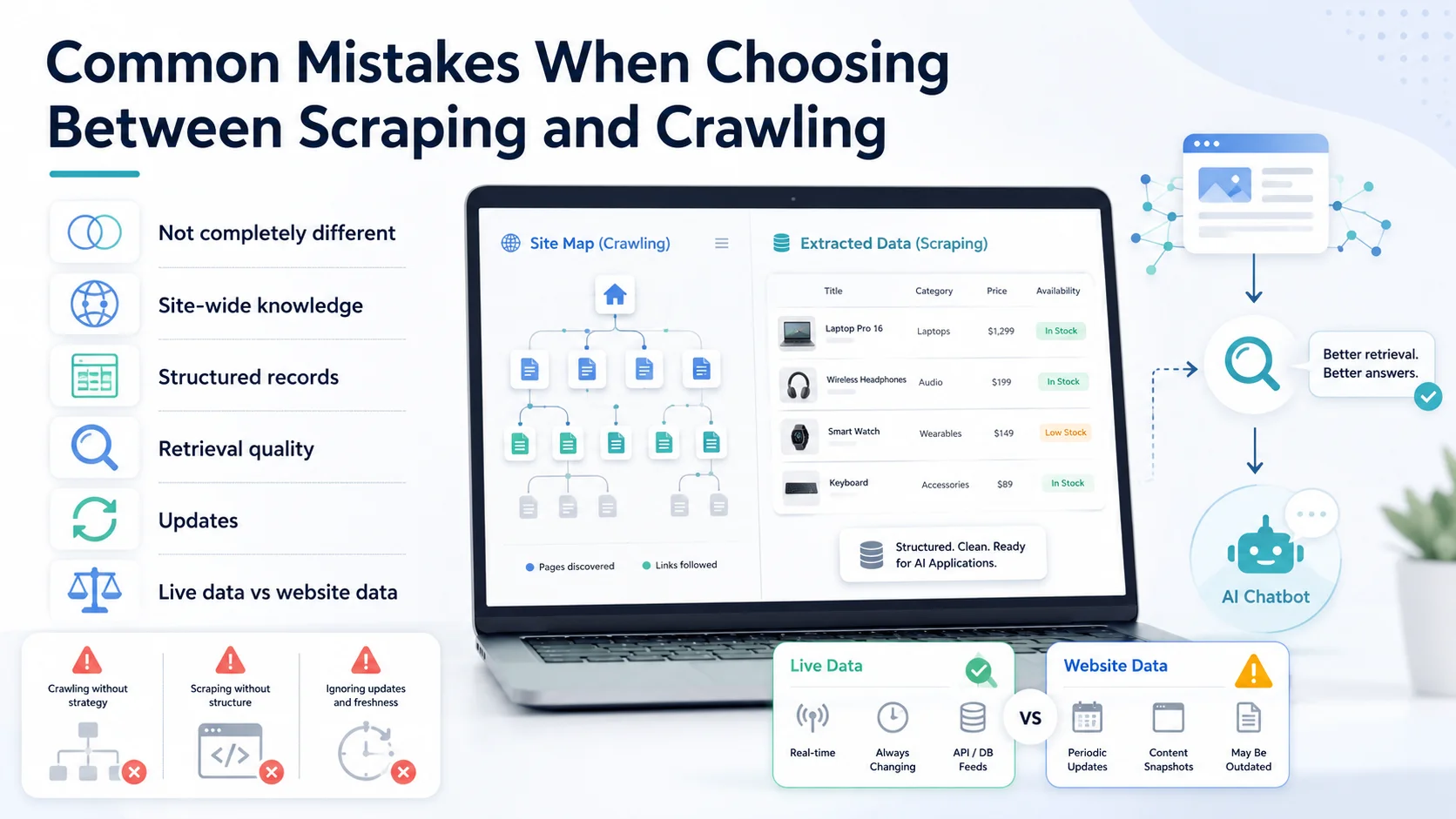
Assuming They Are Completely Different Technologies
They overlap. Crawlers frequently extract content, and scraper frameworks frequently crawl links. The difference is primarily the job each process is optimized to perform.
Choosing a Scraper When You Need Site-Wide Knowledge
Manually configuring extraction for hundreds of different informational pages can become unnecessary work. A crawler-oriented ingestion system may make more sense.
Choosing a Crawler When You Need Precise Structured Records
If you specifically need SKU, price, colour and product ID as independent database fields, a targeted extraction process may give you better control.
Ignoring Retrieval Quality
Getting the content into a database is not enough. The chatbot still needs to retrieve the correct information.
Forgetting Updates
Both scraped and crawled data become stale.
Expecting Website Data to Provide Live Account Information
A website knowledge base and a live business-system integration solve different problems. Do not confuse them.
Final Thoughts
The debate between a website data scraper and an AI website crawler is often framed as if you must choose one technology and reject the other. That is not how modern chatbot knowledge systems need to work. A crawler is primarily responsible for finding the pages.
A scraper or extraction layer is responsible for getting useful information from those pages. A knowledge pipeline then organizes that information so a retrieval system can find it later. And finally, the AI turns the retrieved information into a natural response.
For a small, highly structured dataset, a website data scraper may be exactly what you need. For a chatbot that needs to understand products, services, FAQs, policies and support information spread across an entire business website, an AI website crawler is usually the better starting point.
For more sophisticated systems, use both where each is strongest. The goal is not to collect the most website data. The goal is to give the chatbot the right business information, in the right form, at the moment a customer needs it.