
What Is AI Website Crawling?
Website crawling is the automated process of visiting web pages, following links and collecting accessible information from those pages. A crawler usually begins with one or more starting URLs, often called seed URLs. For example:
https://example.com
The crawler retrieves that page, identifies links to other allowed pages and follows them according to its configured crawl scope.
Amazon Bedrock's current Web Crawler works this way: it starts from specified URLs, follows child links within defined boundaries and can also use sitemap URLs as starting points. It allows crawl depth, URL limits and inclusion or exclusion patterns to be configured.
For an AI chatbot, the goal of crawling is usually not search-engine ranking. The goal is to discover business information that can later become part of the chatbot's knowledge base.
Website Crawling Is Not the Same as AI Model Training
This distinction matters. When a platform says: “Train your chatbot on your website.”
it usually does not mean the underlying large language model is being retrained from scratch on every page. Instead, website content is normally collected and placed into a separate knowledge system.
When a customer asks a question, the system searches that knowledge and provides relevant information to the AI model before it creates an answer. This approach is commonly associated with Retrieval-Augmented Generation, or RAG. For example:
Website content: The Business plan allows 20 users.
Customer asks: “Can our 15-person team use the Business plan?”
The system retrieves the plan information and gives it to the language model. The chatbot can then respond: “Yes. The Business plan supports up to 20 users, so a 15-person team falls within that limit.” The model generates the conversational response. Your website provides the business fact. That difference is fundamental.
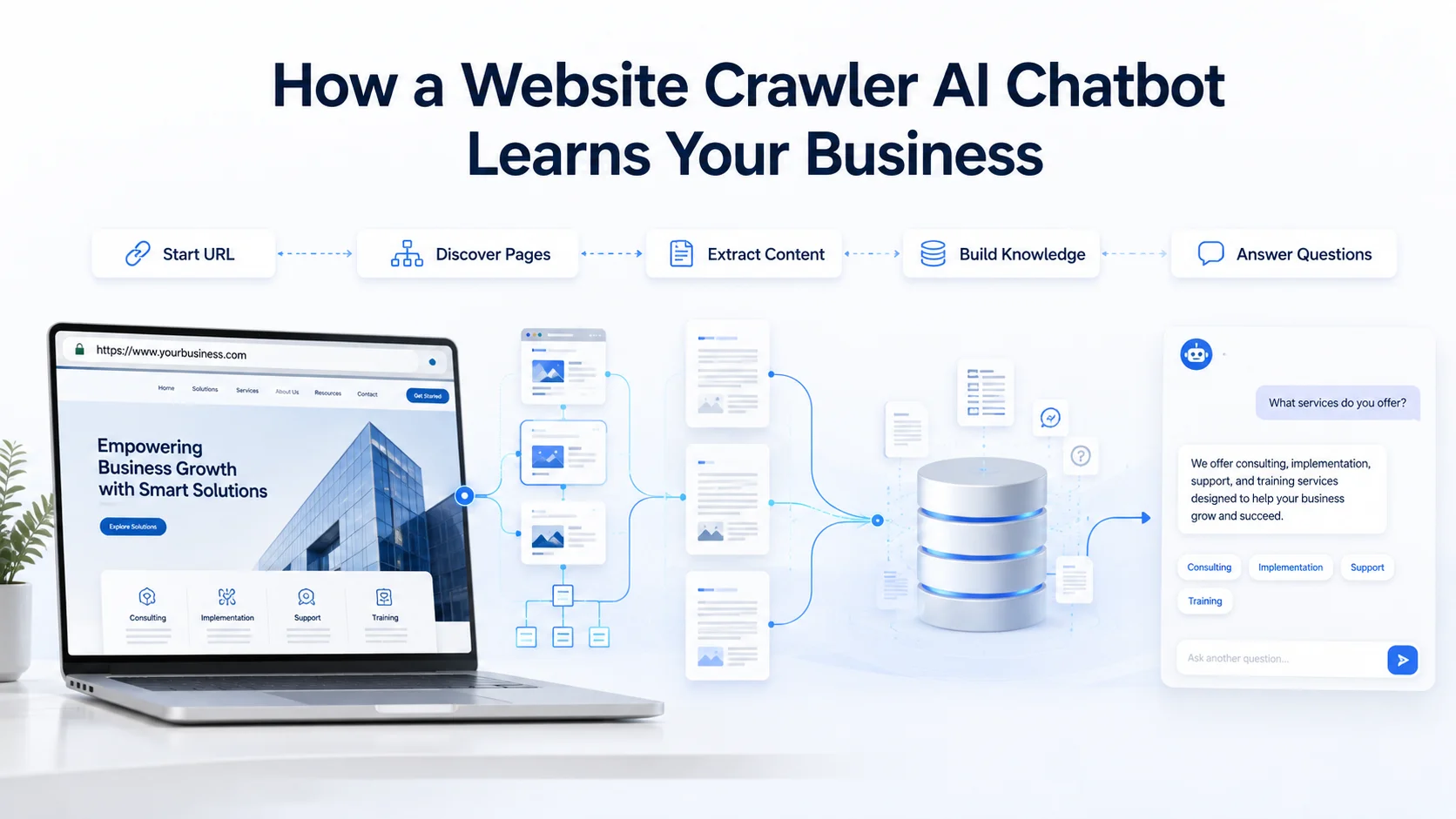
How a Website Crawler AI Chatbot Learns Your Business
The complete process usually involves several stages.
1. You Provide a Starting Website URL
The business first tells the chatbot platform where to begin. For example: https://yourcompany.com The crawler requests that page and analyzes its structure. From there, it may discover links to:
Products
Services
Pricing
FAQs
Policies
Documentation
Support pages
About pages
Contact information
Categories or collections
The crawler does not necessarily follow every link it sees. Well-designed crawling systems allow the scope to be restricted so irrelevant or unwanted areas do not become part of the knowledge base.
AWS's managed crawler, for example, supports same-path, same-host or subdomain crawl scopes as well as include and exclude URL patterns. This matters because a chatbot usually does not need every URL your website has ever generated.
2. The Crawler Discovers Related Pages
Consider a small ecommerce store. The homepage may link to:
Running Shoes → Men's Shoes → Product A
It may also link to:
Help → Shipping → Returns
The crawler follows these relationships to discover pages that contain useful information. This is why website structure matters. If an important page cannot be reached through normal links or a sitemap, some crawlers may struggle to discover it automatically.
Sitemaps can provide crawlers with a structured list of important URLs. AWS's Web Crawler allows sitemap URLs to be supplied directly as crawl starting points.
Search-engine documentation reflects the same broader crawling principle: Google describes sitemaps as an important mechanism for helping crawlers discover and prioritize URLs, particularly on large or rapidly changing websites.
For chatbot training, a clean sitemap can therefore also make it easier to identify which business pages should be considered for ingestion.
3. The Crawler Fetches the Page Content
Once a page is discovered, the crawler requests its content from the website. A simple page might return HTML containing:
Heading
Product description
Price
FAQ content
Policy text
Navigation
Footer
Links
The crawler then needs to determine which parts are useful. For example, the following is valuable: Returns are accepted within 30 days of delivery. But these elements usually provide little useful chatbot knowledge:
Home | Products | Contact | Facebook | Copyright 2026
A good content-processing pipeline attempts to preserve meaningful business information while reducing repetitive navigation, boilerplate and other noise. The exact extraction process differs significantly between chatbot platforms. That is one reason two AI chatbot tools can crawl the same website yet produce different answer quality.
4. Useful Information Is Extracted
The next stage is content extraction. Imagine an ecommerce product page containing:
Trail Runner Pro
Price: $149
Water resistant
Available sizes: 6–12
Designed for trail running
30-day return policy
The system may identify useful attributes such as:
Product name
Price
Description
Features
Variants
Policies
Category relationships
For a service website, it might extract:
Service names
Scope
Pricing
Process
Eligibility
Locations
FAQs
For SaaS, the same process may focus on:
Features
Plans
Integrations
Usage limits
Documentation
Onboarding instructions
This extracted information eventually becomes searchable knowledge.
5. Content Is Cleaned and Organized
Raw website pages contain a lot of repetition. Every page may include the same navigation menu, footer, cookie notice and contact information. If all of this is stored repeatedly, the knowledge base becomes unnecessarily noisy.
Content preparation may therefore involve removing duplicated page elements and keeping the main information. Large documents or pages are also often broken into smaller sections known as chunks.
Amazon Bedrock's managed knowledge-base workflow, for example, supports configurable chunking strategies when ingesting content. Suppose your return-policy page contains five sections:
Standard returns
Sale products
International returns
Damaged products
Refund processing
A customer asks: “Can discounted products be returned?” It is more useful for the retrieval system to locate the Sale Products section than to retrieve the entire policy page. Good chunking helps make that possible.
6. The Content Becomes Searchable AI Knowledge
After processing, the content needs to become searchable. Many RAG systems create numerical representations called embeddings from portions of the content. These allow the system to compare meaning rather than only identical words. For example:
Your website might say: “Cancellation requests may be submitted at any time.”
A customer may ask: “Can I stop my subscription whenever I want?”
Those sentences use different words but express a closely related idea. Semantic retrieval can help connect them. The content and its searchable representations are then stored in an index or knowledge base. When someone later asks the chatbot a question, that knowledge base can be searched for the most relevant information.
7. The Visitor Asks the Chatbot a Question
Now the crawler's work becomes useful. Suppose a visitor asks: “Do you ship to Dubai?” The chatbot does not need to search the entire public internet. The system can search the approved business knowledge collected from your website.
It may retrieve a section from the International Shipping Policy and provide that information to the AI model. The model then creates a conversational answer. That process turns static website information into interactive customer support.
Crawling Helps the Chatbot Learn Relationships Across Your Website
Business information is rarely contained on one perfect page.
A product page may explain specifications.
A separate shipping page explains delivery.
A return page explains refunds.
A FAQ page explains common exceptions.
Website crawling can bring these disconnected sources into one knowledge system. For example, a shopper could ask: “Can this jacket be shipped to France and returned if the size is wrong?” Answering properly may require information from:
The jacket product page
International shipping policy
Returns policy
A useful chatbot knowledge system can retrieve relevant information from several parts of the website and combine it into a clearer answer. This is one reason crawling is valuable on larger websites.
Customers think in questions.
Websites are organized into pages.
The chatbot helps bridge that difference.
What Website Content Should an AI Chatbot Crawl?
Not every URL deserves to become chatbot knowledge. Prioritize pages containing information customers genuinely need.
Product and Service Pages
These explain what the business actually sells. Useful information can include specifications, features, variations, use cases, limitations and service scope.
Pricing Pages
Pricing questions are extremely common in sales conversations. Make sure only current pricing pages are included.
FAQ Pages
FAQs provide strong customer-language knowledge because they already connect questions with approved answers.
Shipping, Return and Refund Policies
These are especially important for ecommerce support.
Help and Documentation Pages
SaaS businesses can use these to support setup, troubleshooting and onboarding questions.
Category and Collection Pages
These can help a chatbot understand how different products or services relate to one another.
About and Contact Information
These may help answer basic company, location and communication questions. The correct crawl set depends on what you expect the chatbot to do. A sales chatbot and technical-support chatbot may need very different sections of the same website.
What Should You Avoid Crawling?
More content does not automatically create a smarter chatbot. Sometimes it creates more ways for the chatbot to become confused. You may want to exclude:
Old landing pages
Expired promotions
Staging pages
Internal search results
Duplicate URLs
Tag archives with little unique content
Outdated products
Old policies
Test pages
Account pages
Checkout pages
Irrelevant blog archives
Private information
For example, imagine your current pricing page says: Pro Plan: $99/month, but an old promotional page still says: Pro Plan: $59/month If both enter the knowledge base, the chatbot may retrieve the wrong one. The best crawling strategy is therefore selective, not simply comprehensive.
Website Structure Can Affect What the Crawler Learns
If your important business information is difficult for crawlers to access, it may also be difficult to ingest reliably. A simple HTML page containing the main content is straightforward. Modern websites can be more complicated.
Some rely heavily on JavaScript to load content only after the page opens. Google's documentation provides a useful general illustration of this crawling problem. Its crawler first retrieves the page, then may need to render JavaScript before it can access dynamically generated content. Google also explicitly notes that not all bots are able to run JavaScript.
That does not mean every AI crawler works like Googlebot. Quite the opposite: crawler capabilities differ. Some AI ingestion systems can render JavaScript. Others mainly process the HTML they initially receive. Therefore, if important product descriptions, FAQs or pricing appear only after complicated client-side interactions, verify that your selected chatbot crawler can actually see them.
Watch for Content Hidden Behind User Actions
Some website content only appears after a visitor:
Clicks a button
Expands a tab
Scrolls
Selects a filter
Logs in
Chooses a product variation
A crawler may not interact with the website exactly like a human visitor. Google's crawler guidance, for example, notes that content requiring user interaction to load may not always be discoverable in the same way as normally accessible page content. Again, each AI crawler behaves differently. The practical rule is simple:
Test whether the chatbot actually learned the information instead of assuming the crawler found it.
Robots.txt and AI Website Crawling
Websites can publish crawler instructions through a robots.txt file. These rules specify which URL paths certain crawlers are permitted or requested to access. Not every crawler behaves identically. Amazon Bedrock's managed Web Crawler explicitly states that it respects robots.txt according to the Robots Exclusion Protocol.
Google also notes that reputable crawlers generally follow robots.txt rules, although the file itself cannot force every crawler on the internet to comply. If you are connecting your own website to an AI chatbot platform, check whether your site's crawler settings allow the service to reach the content you actually want included.
But do not use robots.txt as a security system. Google's documentation correctly points out that robots.txt is primarily a crawl-control mechanism rather than a method for protecting confidential content. Truly private information should be protected through authentication or other access controls.
Crawling Public Content vs Private Content
Public website crawling is relatively straightforward. Private knowledge is different. Imagine you want the chatbot to know an internal technical manual that is not publicly available. You should not simply publish the file online so the crawler can discover it.
Instead, use a platform that supports controlled document uploads or authenticated knowledge sources. AWS's current managed Web Crawler, for example, supports no authentication as well as Basic, Form and SAML authentication for approved crawling scenarios.
Other chatbot platforms allow businesses to upload private documents directly rather than crawling them through the public website. The important principle is: Public website knowledge and private business knowledge should be managed differently.
AI Website Crawling for Ecommerce
Ecommerce websites show why automated crawling can be valuable. A store may contain hundreds or thousands of products. Manually creating a chatbot answer for each one would be impractical. A crawler can potentially discover:
Product titles
Descriptions
Categories
Collections
Variants
Specifications
Size information
Shipping policies
Return policies
Product FAQs
Imagine a store selling running shoes. A shopper asks:
“Which shoes are better for marathon training?”
The chatbot can search the knowledge it has collected from relevant product pages. Then another shopper asks:
“Can I return them if the size is wrong?”
That answer may come from the store's return policy. The crawler helps place these separate pieces of information inside the same knowledge system. But crawling has a limit. It does not automatically provide live access to:
Current customer orders
Real-time stock
Account data
Private delivery status
Refund processing
Those capabilities normally require integrations with live business systems. Crawling learns what your website says. Integrations allow the chatbot to interact with what your systems currently know or can do.
AI Website Crawling for SaaS Companies
A SaaS website may have information spread across:
Main marketing pages
Features
Pricing
Documentation
Help center
Integration pages
Release information
Onboarding guides
A visitor might ask: “Does the Starter plan integrate with Shopify?” Answering could require information from both a pricing page and an integration page.
Crawling can bring those sources into a shared knowledge system. This allows the chatbot to act more like a conversational layer across the website rather than forcing the visitor to understand where every piece of information is stored.
AI Website Crawling for Service Businesses
Service businesses often have fewer pages, but crawling can still improve visitor assistance. Suppose an accounting firm has separate pages for:
Bookkeeping
Payroll
Tax services
Pricing
Consultation process
FAQs
A visitor might ask: “I run a small ecommerce business. Which service would I need for monthly bookkeeping and payroll?”
A chatbot with access to those service pages can explain the relevant available services and guide the visitor toward the appropriate next step. The crawler does not replace professional judgment. It simply makes the company's published information easier to access conversationally.
Why Recrawling Matters
Your website is not static.
A product gets updated.
A price changes.
A new service launches.
A policy is rewritten.
If your chatbot was trained six months ago and never refreshed, it may continue answering from information that no longer exists. That is why recrawling is important.
A chatbot platform may provide manual, scheduled or automated website refresh options. After a recrawl, new or changed content can be processed and the knowledge base updated. Think of this as synchronization between:
What your website says today and what your chatbot knows today.
Without that synchronization, even a technically excellent retrieval system can provide outdated answers.
How Often Should You Recrawl Your Website?
There is no universal schedule. It depends on how frequently your business changes. A small professional-services website may only change occasionally. A SaaS company might update features and documentation every week. An ecommerce store may change products, categories, prices and policies much more frequently. A sensible strategy is to consider the importance and volatility of the content.
High-change content:
Products, pricing, availability and frequently updated documentation may need more frequent synchronization.Medium-change content:
Service pages and FAQs may need periodic reviews.Low-change content:
About pages and company-history content may rarely change.
The important point is not to recrawl for the sake of recrawling. Refresh knowledge when the source information changes enough to affect customer answers.
Crawling Does Not Automatically Mean the Chatbot Understands Everything
A crawler can successfully fetch a page while the chatbot still performs poorly. Why? Because crawling is only the first stage. Problems can occur during:
Content extraction
Cleaning
Chunking
Indexing
Retrieval
Ranking
Response generation
For example, suppose the crawler successfully collects your 5,000-word returns document. A customer asks: “Are sale items refundable?”
If the document was divided poorly or the correct section cannot be retrieved, the chatbot may still fail. This is why chatbot evaluation should focus on answers, not simply the number of pages crawled.
How to Test Whether Your AI Crawler Learned the Website Properly
After crawling, create a realistic test set. Do not simply ask: “What does this website do?” Test specific business facts. For example:
“How much is the Business plan?”
“Do you ship internationally?”
“Can sale products be returned?”
“Which plan includes analytics?”
“Does Product X work with Model Y?”
“What happens if I cancel?”
Then test different wording: “Can I send discounted stuff back?” instead of: “Are sale items eligible for returns?”
Also test information the chatbot should not know. Ask: “What product are you launching next month?” If that information is not on the website or approved knowledge, the chatbot should not invent an answer.
Measure Content Coverage, Not Just Crawl Count
A platform might report: 2,000 pages crawled. That sounds impressive. But page count is not the same as knowledge quality. A better question is:
Did the crawler capture the pages required to answer our important customer questions? You may only need 100 strong pages instead of 2,000 weak ones. Useful checks include:
Important pages successfully discovered
Critical FAQs included
Current policies available
Outdated URLs excluded
Product information captured correctly
Relevant answers retrieved
Missing knowledge identified
Changed pages refreshed
A targeted crawl usually creates a cleaner knowledge base.
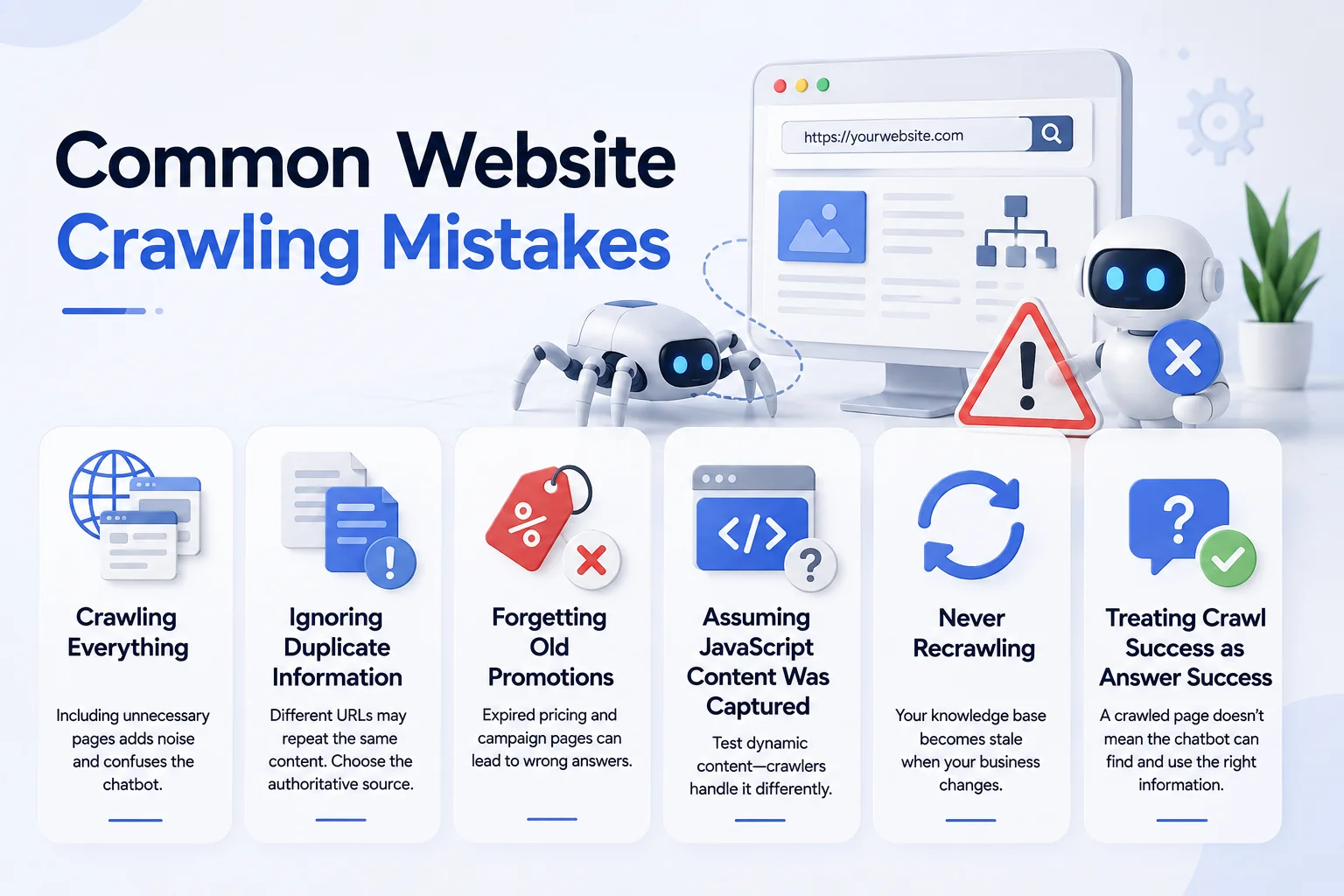
Common Website Crawling Mistakes
Crawling Everything
Your website probably contains pages the chatbot does not need. Including every archive, campaign and outdated page can introduce noise.
Ignoring Duplicate Information
Several URLs may contain slightly different versions of the same information. Decide which page is authoritative.
Forgetting Old Promotions
Expired pricing and campaign pages can create serious customer-facing errors. Exclude them.
Assuming JavaScript Content Was Captured
Always test information that appears dynamically. Different crawlers have different rendering capabilities.
Never Recrawling
A chatbot knowledge base becomes stale when the business changes.
Treating Crawl Success as Answer Success
A page appearing in a crawler dashboard does not guarantee the chatbot can retrieve its important information correctly. Test actual questions.
Can Website Crawling Improve the Website Itself?
Yes, indirectly. Once customers begin using the chatbot, conversation data can reveal weaknesses in the underlying website. Suppose 100 visitors ask:
“Do you offer international shipping?”
The crawler may have successfully learned the answer from your shipping policy. But the repeated question tells you something else: Perhaps international shipping information is too difficult for normal visitors to find. You can improve the page itself. The same applies to:
Pricing confusion
Product compatibility questions
Service differences
Return conditions
Setup instructions
Cancellation policies
Chatbot conversations can therefore create a feedback loop: Website content → crawler → chatbot knowledge → customer questions → content improvements That loop can make both the chatbot and website more useful over time.
How Agent Best AI Uses Website Crawling
Agent Best AI currently uses website crawling as the first stage of its chatbot-building workflow. Businesses enter their website URL, and AgentBest.ai scans public pages to identify products, services, pricing information, FAQs, policies and other useful business content. Its current How It Works page describes the crawler as following website structure and organizing this information into an AI knowledge base.
The platform currently lists content such as product and service pages, categories and collections, features, pricing, FAQs, help-center content, shipping and return policies and public support resources among the information it can learn from a website.
Businesses can then add information that may not exist publicly, including FAQs, policies, manuals, pricing documents and support materials. After the knowledge has been prepared and tested, the AI agent can be deployed through a website widget to answer questions using the website and additional knowledge sources.
AgentBest.ai also currently supports recrawling updated website content, which is particularly important when products, services, pricing or policies change. For ecommerce businesses, this means the crawler can learn from product pages, collections, categories, FAQs and policies.
For SaaS businesses, it can work with features, plans and support content. Service companies can use their service pages, pricing information and FAQs as the starting knowledge. The process removes much of the manual work of entering every website answer individually.
Is Website Crawling Enough by Itself?
Sometimes. For a small public website with complete information, website crawling may provide most of the knowledge the chatbot needs. In other cases, it is only the beginning. Your business may also need:
Private documentation
Product manuals
Detailed FAQs
Internal support guides
Updated price sheets
CRM information
Customer account data
Live inventory
Order information
Private documents can be added through controlled knowledge sources. Live business data normally requires integrations rather than crawling. This leads to a useful distinction:
Website crawling builds baseline business knowledge.
Uploaded documents expand that knowledge.
Integrations provide access to live systems and actions.
A strong business chatbot may eventually use all three.
Final Thoughts
A website crawler AI chatbot helps turn a static website into a usable source of conversational knowledge. The process begins with URLs, but it does not end there.
The crawler has to discover relevant pages, extract useful content and organize that information for retrieval. The knowledge must then be searched accurately when customers ask questions, and it must be refreshed whenever the business changes.
The best results do not come from crawling the largest possible number of pages. They come from crawling the right pages.
Give the chatbot current products, services, FAQs, pricing, policies and support information. Remove outdated and conflicting sources. Test what the crawler actually learned and recrawl when important information changes.
When that process works well, customers no longer need to understand how your website is organized. They simply ask what they need to know, and the chatbot can find the relevant information for them.