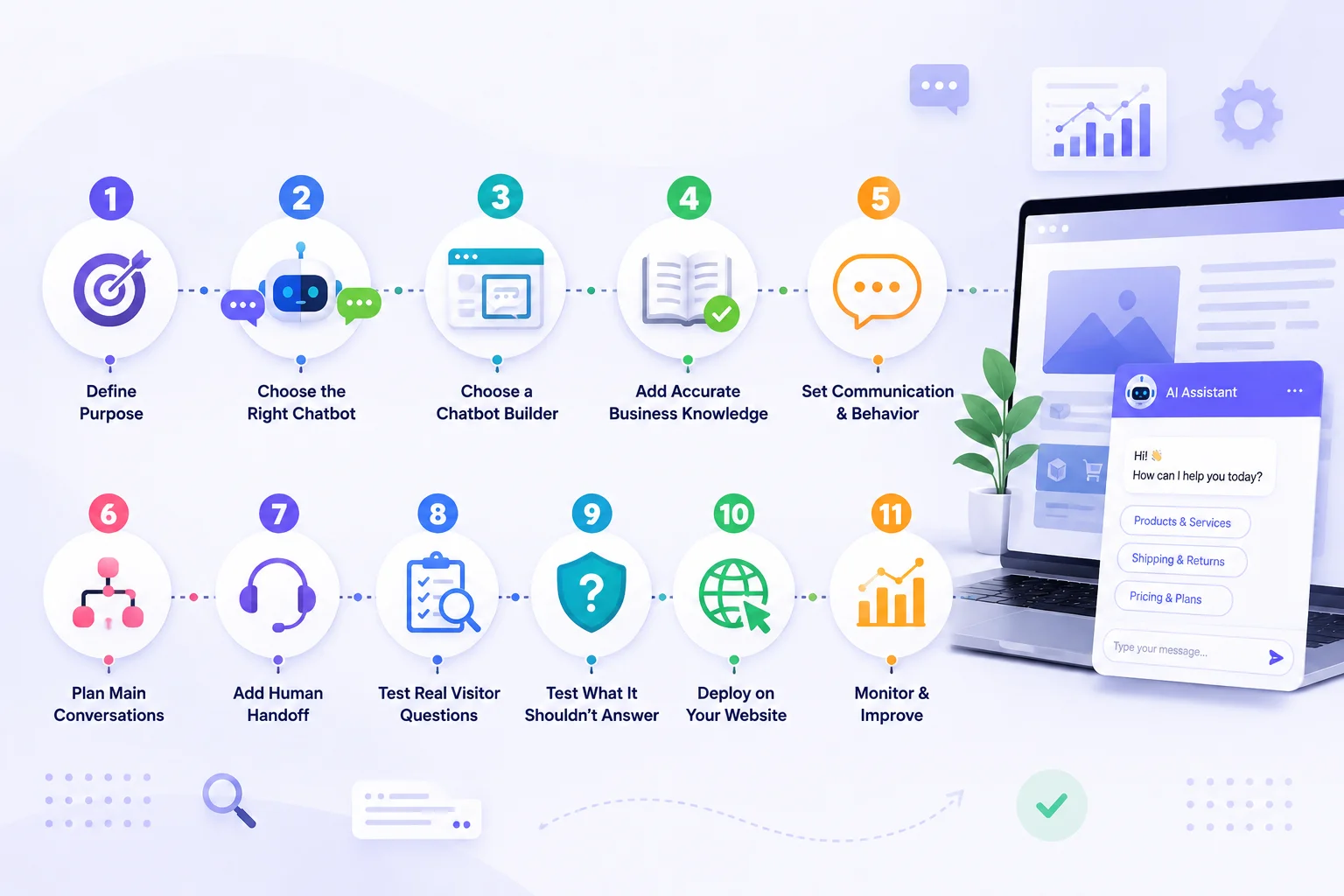
Step 1: Decide Why Your Website Needs a Chatbot
Before choosing a platform, identify what you want the chatbot to accomplish. Do you want it to answer customer questions? Help shoppers find products? Explain services? Capture leads? Support users outside normal working hours? A clear objective makes the chatbot easier to build and much easier to measure.
For example, an ecommerce store may want the chatbot to handle questions about products, shipping, returns, and compatibility. A SaaS company might focus on features, pricing, integrations, and onboarding. A service business may want to explain services and collect enquiry details.
Trying to make one chatbot handle every possible conversation from day one usually creates a confusing experience. Start with the most common and useful task.
Step 2: Choose the Right Type of Chatbot
Not every website needs the same kind of chatbot. A rule-based chatbot follows predefined buttons and conversation paths. It can work well for simple tasks such as directing visitors to departments or collecting contact details.
An AI chatbot is more flexible. Visitors can ask questions in their own words, and the chatbot can use business knowledge to provide a relevant response. For example, instead of choosing from:
“Pricing”
“Features”
“Support”
a visitor could simply ask: “Which plan is best if I have a small team?” An AI chatbot can understand the question and respond using the company’s pricing and plan information. For most businesses with detailed websites, products, services, FAQs, or support content, an AI chatbot is usually more useful than a completely scripted conversation.
Step 3: Choose a Website Chatbot Builder
Once you understand the purpose, choose a platform that can support it. A modern website chatbot builder should make it easy to add business knowledge, configure the chatbot, test conversations, and deploy it to your website. Important things to check include:
Website content training
Document uploads
Human handoff
Lead capture
Knowledge updates
Conversation history
Analytics
Multilingual support
Website integrations
Privacy and access controls
Do not choose a platform only because it promises the most AI features. Ask a simpler question: Can this platform reliably handle the conversations my visitors actually have? That is what matters.
Step 4: Give the Chatbot Accurate Business Knowledge
Your chatbot cannot give reliable answers if the information behind it is unreliable. Before training it, review the content it will use. This might include:
Product pages
Service pages
Pricing information
FAQs
Shipping policies
Return and refund policies
Help articles
Manuals
Support documents
Uploaded PDFs
If two pages contain different information, fix the conflict first. For example, if one page says your return period is 14 days and another says 30 days, the chatbot may not know which answer is correct.
The same applies to prices, product specifications, service conditions, business hours, and delivery information. A useful website chatbot depends on a clean and accurate knowledge base.
Step 5: Decide How the Chatbot Should Communicate
Your chatbot should sound like part of your business. That does not mean every response needs to feel heavily branded. It simply means the tone should match the way your business normally communicates.
A professional services company may prefer clear and formal responses. An ecommerce brand may use a more conversational style. A SaaS business may want concise and practical answers. More importantly, define the chatbot’s behaviour. For example, instruct it to:
Use only approved business information
Keep answers clear and relevant
Ask follow-up questions when needed
Avoid unsupported promises
Admit when information is unavailable
Offer human assistance for complex requests
These instructions help create more consistent conversations.
Step 6: Plan the Main Website Conversations
AI chatbots allow open-ended questions, but you should still understand the main paths visitors are likely to take. Imagine the most common conversations on your website.
For an ecommerce store, those might include product questions, sizing, shipping, returns, payment information, and product comparisons.
For a SaaS website, they could include features, plans, integrations, onboarding, and technical support.
For a service company, common conversations might involve service selection, pricing, project requirements, availability, or consultation requests.
Think about what should happen after the chatbot answers the question. Should it guide the visitor to a page? Collect an enquiry? Recommend another resource? Offer human support? Good chatbot conversations have a useful next step.
Step 7: Add Human Handoff
One of the biggest chatbot mistakes is trying to keep every customer inside automation. Some conversations need a person. A customer may have an unusual complaint, a billing dispute, a technical problem, a custom pricing request, or a situation that requires approval. Your chatbot should know when to stop automating and transfer the conversation.
Ideally, the human representative should receive the previous messages and information already collected. For example, if a visitor has already explained the issue, provided an order number, and identified the product involved, they should not need to repeat everything after the handoff. The chatbot should make human support easier, not harder.
Step 8: Test Real Visitor Questions
Do not test your chatbot only with perfectly written questions. Real customers may type:
“where my order”
“does this work iphone pro?”
“price for small team?”
“can i return opened item”
Your chatbot needs to understand realistic language, including spelling mistakes, incomplete questions, abbreviations, and follow-ups. You should also test conversation context. For example:
Visitor: “Tell me about the Growth plan.”
Visitor: “Does it include multilingual support?”
The chatbot should understand that the second question still refers to the Growth plan. Testing this way gives you a much more realistic picture of how the chatbot will perform after launch.
Step 9: Test Questions It Should Not Answer
This step is just as important as testing correct answers. Ask the chatbot questions that are outside its knowledge. For example:
“Can you give me a 50% discount?”
“Will this product definitely cure my problem?”
“Can you guarantee delivery tomorrow?”
“What is the CEO’s private phone number?”
A reliable chatbot should not invent an answer just because the visitor asks confidently. When the information is unavailable or inappropriate, the chatbot should explain that it cannot confirm the request and offer a suitable next step. A chatbot that knows its limits is often more trustworthy than one that tries to answer everything.
Step 10: Deploy the Chatbot on Your Website
After testing, add the chatbot to the website. Most modern chatbot builders provide a widget, embed code, plugin, or another simple deployment method. Think carefully about where the chatbot should appear. It may be useful on:
Homepage
Product pages
Service pages
Pricing pages
Support pages
Contact pages
Ecommerce checkout-related pages
The chatbot should be visible without interrupting the user. Avoid aggressive pop-ups that cover important content as soon as someone enters the website. The opening message should also tell visitors what the chatbot can help with.
Instead of: “Hi! How can I help?” an ecommerce store might use: “Need help with products, shipping, or returns? Ask me.” That immediately gives the visitor context.
Step 11: Monitor Conversations After Launch
A chatbot is not finished when it goes live. Real visitors will ask questions you did not expect. Review conversations regularly to understand where the chatbot works well and where it struggles. Look for repeated questions, unresolved conversations, incorrect answers, human handoffs, and topics customers frequently ask about.
Sometimes the chatbot will reveal a problem with your website rather than with the AI itself. If customers constantly ask whether a product includes a particular feature, the product page may need clearer information. If people repeatedly ask how cancellations work, your cancellation policy may be difficult to understand. Chatbot data can therefore help improve both the chatbot and the website.
How to Build a Chatbot for an Ecommerce Website
Ecommerce websites are particularly suitable for chatbots because shoppers often need answers while deciding whether to purchase. Start by providing accurate product information, categories, FAQs, delivery details, payment information, and return policies. Then test real shopping questions such as:
“Which size should I choose?”
“Does this accessory fit the Pro model?”
“Do you deliver internationally?”
“Can I return this if it doesn't fit?”
The chatbot can help shoppers understand available information and find relevant products. It should not claim access to information it does not have. For example, checking a specific customer order, live stock level, or real-time delivery status requires an appropriate integration. Without that connection, the chatbot should explain the general process or offer human assistance.
How Much Content Does a Website Chatbot Need?
There is no fixed amount. A small service website may only need a few service pages, FAQs, pricing information, and contact details. A large ecommerce store may require hundreds or thousands of product pages, policies, categories, and support documents.
The quality of the content matters more than simply adding as much information as possible. The chatbot needs clear, current, and relevant information. If your website contains outdated pages, duplicated policies, or contradictory answers, adding more content can actually make the chatbot less reliable. Start with the most useful sources and expand as needed.
Do You Need Coding Skills?
Not necessarily. A standard website chatbot can now be created through no-code platforms that handle the underlying AI, knowledge processing, chat interface, and basic deployment. You may still need technical support for advanced requirements such as custom APIs, internal systems, secure account actions, unusual integrations, or highly customized user interfaces.
This is where the difference between no-code and custom chatbot development becomes important. If your main goal is answering website questions, guiding visitors, capturing enquiries, or providing basic customer support, a no-code approach may be enough. If the chatbot needs to perform complex actions inside proprietary systems, development work may still be required.
Common Mistakes to Avoid
One common mistake is launching the chatbot with outdated website information. Another is trying to automate every conversation. Businesses also sometimes hide human support because they want the chatbot to handle more requests. This can quickly frustrate customers when the chatbot reaches its limit.
Other problems include unclear chatbot instructions, weak testing, poor mobile placement, and failing to review conversations after launch. A successful chatbot should be treated as part of your customer experience, not simply a technical widget.
How Agent Best AI Helps You Build a Website Chatbot
AgentBest.ai is designed around a simple website-first process. You enter your website URL, and the platform can scan relevant products, services, FAQs, policies, and other business information. Additional PDFs, manuals, pricing documents, FAQs, and support content can also be added to improve the chatbot’s knowledge.
After the knowledge is prepared, the AI agent can be configured and deployed through a website widget. The chatbot can then answer visitor questions, guide users, assist customer-support and sales conversations, collect enquiries, and transfer more complex requests to the business team.
For ecommerce stores, this may include product and policy questions. SaaS companies may use it for features, plans, and onboarding. Service businesses can use it to explain services and prepare enquiries for human follow-up. This workflow aligns directly with AgentBest.ai’s How It Works positioning: learn from the website, add additional knowledge, deploy the assistant, and continue improving it over time.
Final Thoughts
Learning how to build a chatbot for your website is no longer mainly about programming. The most important work is deciding what the chatbot should do, preparing reliable information, setting clear boundaries, testing real conversations, and continuing to improve it after launch.
Start with one clear problem. Give the chatbot accurate knowledge. Make human support easy to reach. Then use real conversations to improve the experience. A website chatbot is successful when visitors can get useful answers faster, not simply when the chatbot sends more messages. The technology makes deployment easier in 2026, but thoughtful setup is what turns a chatbot from a website widget into a useful business assistant.