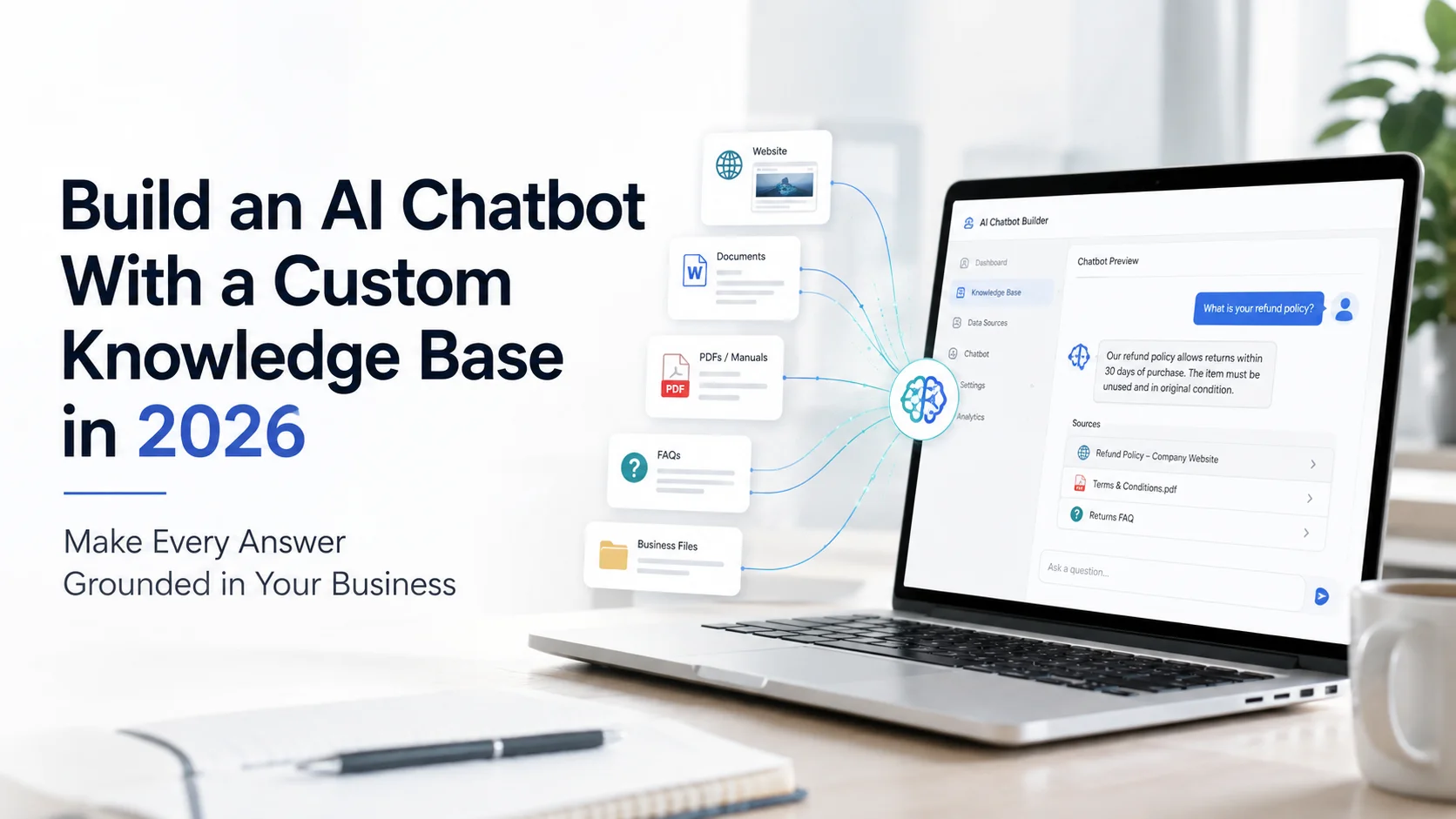
What Is a Custom Knowledge Base for an AI Chatbot?
A custom knowledge base is a collection of information that an AI chatbot can retrieve when answering questions. It might include:
Website pages
Product information
Service descriptions
FAQs
Pricing documents
Shipping and return policies
User manuals
Troubleshooting guides
Help-centre articles
Internal documentation
PDFs and business files
Structured business data, where supported
The important word is custom. The chatbot is no longer relying only on the general information learned by its underlying language model. It is being given access to information selected specifically for your organization.
For example, imagine a visitor asks: “Can I return a sale item after opening it?” A general language model could explain how returns commonly work. A chatbot connected to your custom knowledge base should instead search your actual return policy and answer using the conditions your business has published.
This pattern is commonly implemented through Retrieval-Augmented Generation, usually shortened to RAG. Google Cloud describes RAG as combining information retrieval with generative language models so responses can be grounded in external or proprietary information.
Custom Knowledge Base Does Not Usually Mean Retraining the AI Model
This distinction is important. When people say they are “training an AI chatbot on company data,” they often imagine that every document is being permanently taught to the underlying language model. That is not normally how a modern knowledge-based chatbot works.
With RAG, the base model stays largely unchanged. Your business content is stored and indexed separately. When a user asks a question, the system retrieves relevant information and supplies that information to the language model as context before it creates the response.
AWS describes this process as retrieving relevant chunks from a knowledge base and adding that context to the user prompt before sending it to the model. This approach is particularly useful because your business information can change without requiring you to retrain an entire AI model every time you update a price, policy or product.
How a Custom Knowledge Base Chatbot Works Behind the Scenes
You do not need to understand every technical component to use a no-code platform, but knowing the basic architecture helps you choose and manage the system more effectively.
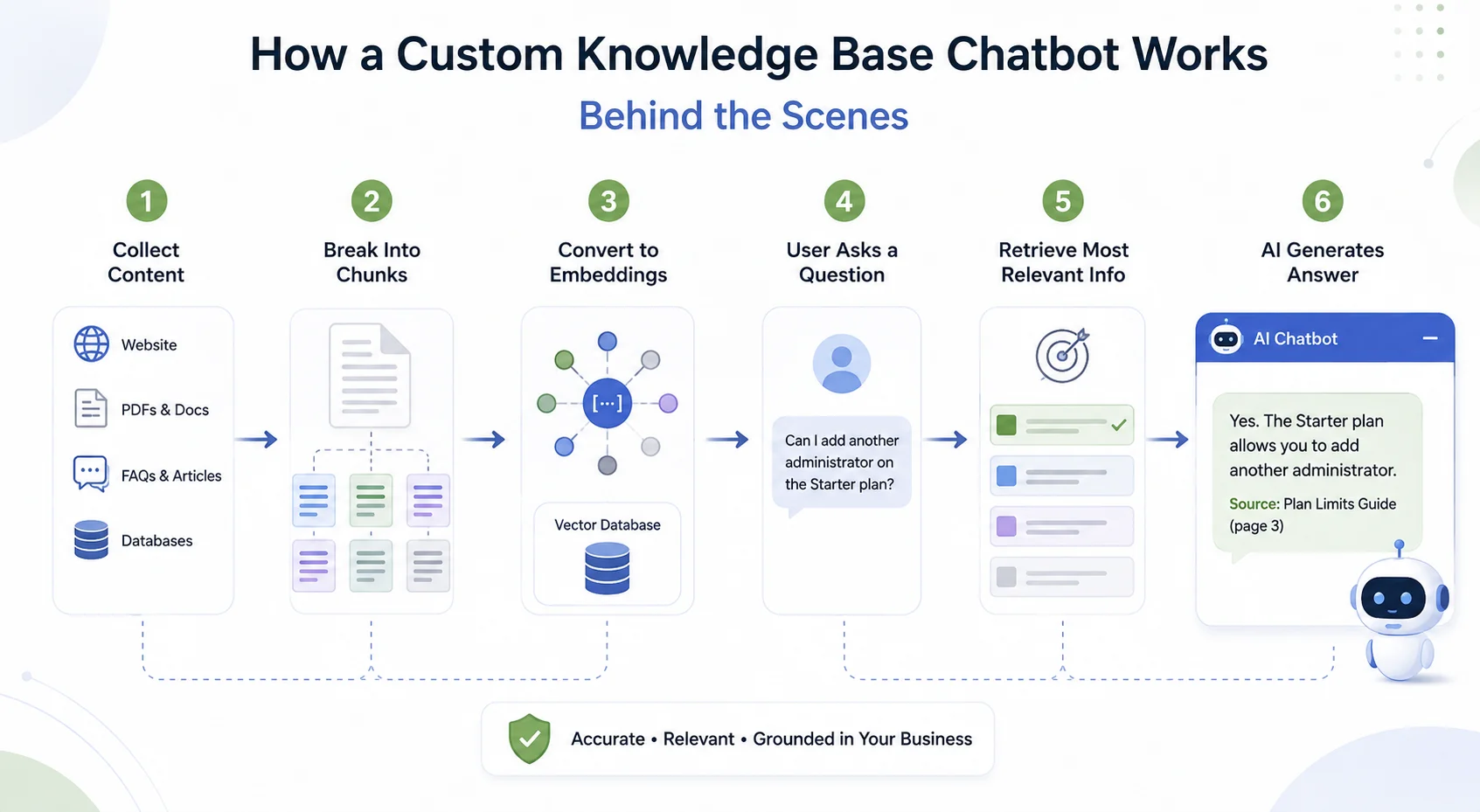
1. Your Business Content Is Collected
The process starts with data sources. You may provide your website, documents, help articles, product information or other approved business content. Depending on the platform, these sources may be uploaded manually, connected through integrations or automatically discovered through website crawling.
A mature knowledge system can potentially work with both unstructured content such as PDFs and HTML pages and structured sources such as databases, although support varies by platform. Amazon Bedrock, for example, currently supports both unstructured knowledge sources and structured data stores in its knowledge-base architecture.
2. Large Documents Are Broken Into Smaller Sections
A 100-page manual is too large and imprecise to retrieve as one piece every time someone asks a question. Knowledge systems therefore normally split content into smaller sections, commonly called chunks. Imagine a shipping document containing separate sections for domestic shipping, international shipping, express delivery and restricted destinations.
If someone asks: “Do you deliver to Germany?” the system should retrieve the international-shipping section rather than send the entire shipping manual to the language model.
Microsoft's current RAG guidance specifically recommends dividing larger documents into chunks during indexing so individual sections can be matched independently to user questions. Chunking sounds technical, but its business impact is simple: better-sized pieces of information can make retrieval more precise.
3. Content Is Converted Into Searchable Representations
Many modern knowledge bases create embeddings from the content. An embedding is a numerical representation of meaning. Instead of searching only for identical words, embeddings allow the system to recognise that:
“Can I send this back?” may be related to: “Return and exchange policy.”
AWS explains that knowledge-base documents can be converted into vector embeddings that are compared with vector representations of user queries to identify semantically related content. These embeddings are typically stored in a vector database or vector index. You do not necessarily need to manage this infrastructure yourself. Many no-code and managed AI platforms handle it automatically.
4. The User Asks a Question
Once the knowledge base is ready, the chatbot can receive natural-language questions. Suppose a SaaS customer asks: “Can I add another administrator on the Starter plan?” The chatbot first interprets what the customer wants to know. The retrieval system then searches the knowledge base for information about the Starter plan, user roles and administrator limits.
5. The Most Relevant Information Is Retrieved
The system does not normally send every document in the knowledge base to the AI model. It retrieves the pieces most likely to answer the question. Basic implementations may use semantic vector search. More advanced systems can combine vector similarity with traditional keyword search. This is known as hybrid search.
Microsoft's 2026 Azure AI Search guidance recommends hybrid approaches that combine keyword and vector retrieval when maximum recall is important. Its newer agentic retrieval architecture can also break complex questions into several subqueries, retrieve information in parallel and semantically rank the results.
For a business using a managed chatbot platform, much of this happens automatically. But it explains why two chatbot platforms trained on the same documents can still produce very different results: retrieval quality matters.
6. The AI Generates an Answer From the Retrieved Context
After the relevant information has been retrieved, it is provided to the language model alongside the customer's question. The AI then creates a natural-language answer based on that context. For example:
Knowledge base information:
Growth plan supports up to 15 team members.Customer:
“Can our 12-person support team use the Growth plan?”Chatbot:
“Yes. The Growth plan supports up to 15 team members, so a 12-person team falls within the current limit.”
The language model makes the response conversational. The knowledge base provides the factual grounding. Some RAG systems can also return citations or source references so users or administrators can see which source supported an answer. AWS's Retrieve And Generate workflow, for example, can return citations to specific source chunks used during generation.
Why Use a Custom Knowledge Base Instead of General AI Knowledge?
General purpose AI is useful for broad reasoning and language tasks. Business questions are different. Your customer does not want the average return policy across thousands of companies. They want your return policy. They do not want a general explanation of SaaS pricing. They want to know what is included in your Growth plan. A custom knowledge base makes it possible to ground answers in:
Your products: specifications, variants and compatibility.
Your services: scope, processes and requirements.
Your policies: shipping, refunds, cancellations and warranties.
Your documentation: setup, troubleshooting and onboarding.
Your pricing: plans, packages and published conditions.
Your terminology: the way your business names features, products or processes.
This is why knowledge grounding is especially valuable for customer-facing AI.
Custom Knowledge Base vs Fine-Tuning
A custom knowledge base and fine-tuning solve different problems. RAG and knowledge bases are mainly about giving the AI access to the right information. Fine-tuning is mainly about changing or specialising how a model behaves.
Microsoft's 2026 guidance recommends RAG when information changes frequently or when applications need access to current or private information, while fine-tuning is more appropriate for stable, specialised tasks.
Google Cloud similarly describes RAG as retrieving new context from business data for each interaction, which makes it useful for frequently changing or private information. Suppose your product prices change every month. Adding the latest pricing to a knowledge base and re-indexing it is much more practical than fine-tuning the model every month.
On the other hand, if you need a model to consistently produce a very specialised format or perform a narrowly defined task, fine-tuning may be worth considering. Some advanced applications use both. For most business website chatbots, however, a custom knowledge base is the more practical starting point for company-specific information.
How to Build AI Chatbot With Custom Knowledge Base
The technical architecture may sound complicated, but the implementation process can be straightforward, particularly with a managed or no-code chatbot builder.
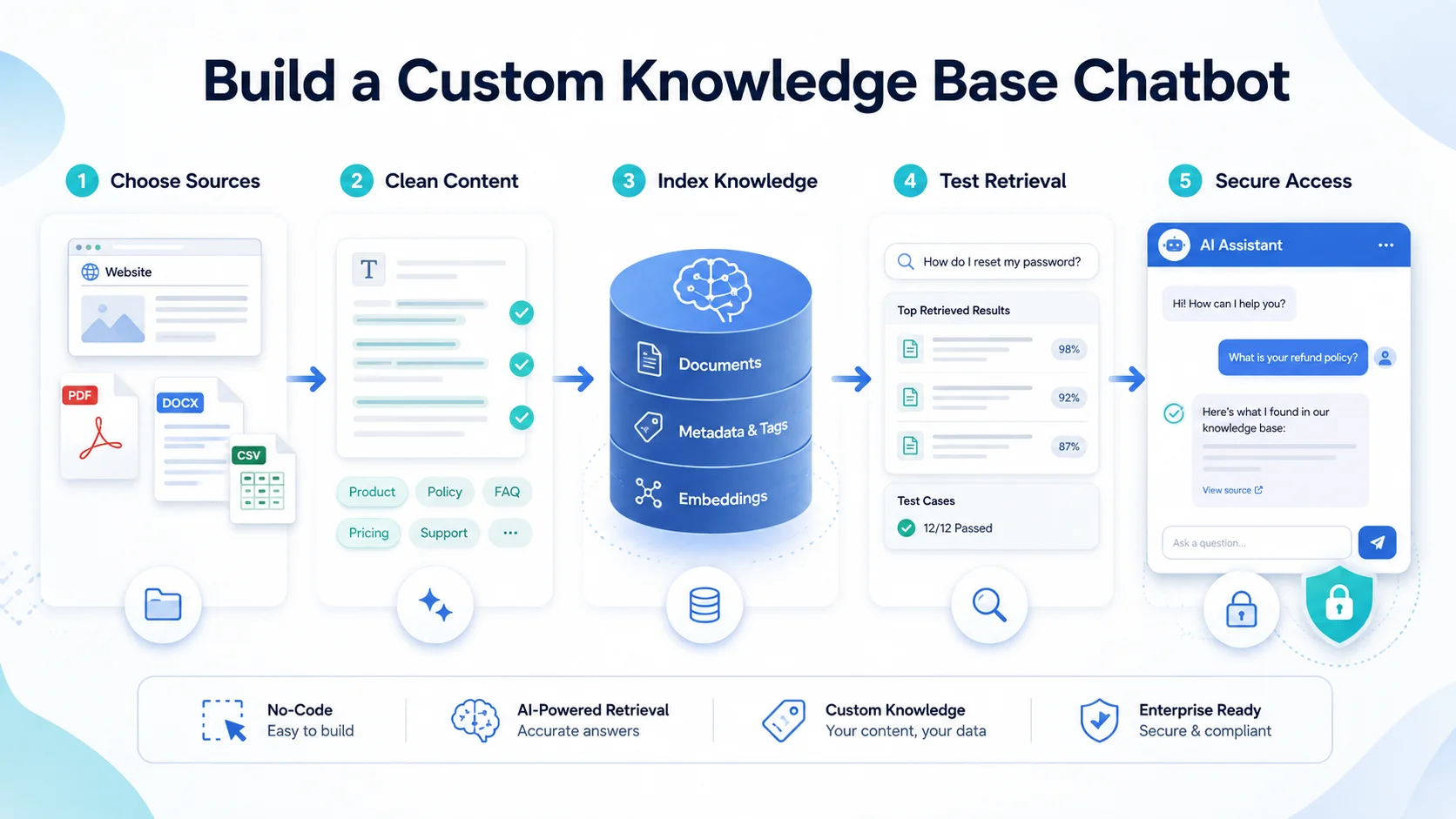
Step 1: Define What the Chatbot Should Know
Do not begin by uploading every file your company owns. Start with the questions the chatbot needs to answer. For customer support, that might include:
Account questions
Returns
Troubleshooting
Policies
Setup instructions
For sales, it could include:
Product differences
Services
Pricing
Features
Qualification information
For ecommerce, the knowledge may focus on products, specifications, shipping, returns, warranties and size information. A focused knowledge base is easier to test and maintain.
Step 2: Choose Your Sources Carefully
Identify the authoritative source for each important subject. For example:
This reduces ambiguity. If five documents contain slightly different versions of the same policy, uploading all five may create retrieval problems. One clear source of truth is better than several conflicting sources.
Step 3: Clean the Content Before Uploading It
Poor content produces poor retrieval. Before adding documents, remove outdated information, duplicate policies, old pricing sheets and unnecessary drafts. Make headings descriptive.
Instead of: Additional Information use: International Shipping Times
Instead of: Other Rules use: Refund Conditions for Sale Products
Clear structure helps both customers and retrieval systems understand what information a section contains.
Step 4: Add Useful Metadata Where Supported
Metadata describes a document without becoming part of its main text. For example, a product document might include:
Product category
Region
Language
Document type
Publication date
Product ID
Version
Metadata can help a retrieval system narrow its search. For example, if a customer asks about a European shipping policy, the system could filter for documents tagged with the correct region rather than searching every shipping document.
AWS Knowledge Bases currently supports metadata filtering before retrieval, including filtering based on document attributes. For simple customer-facing chatbots, your platform may manage this automatically. For larger knowledge systems, metadata becomes increasingly valuable.
Step 5: Import and Index the Knowledge
Once the information is ready, add it to your chosen chatbot platform. Depending on the system, this may involve:
Entering your website URL
Uploading documents
Connecting a help centre
Connecting a database
Importing structured data
Using an API or integration
The platform then processes the information, chunks it where needed and indexes it for retrieval. Managed knowledge-base systems can automate much of this pipeline. AWS, for example, documents a managed workflow that fetches documents, chunks them, creates embeddings and stores those embeddings in a vector database.
Step 6: Define How the Chatbot Should Use the Knowledge
The knowledge base controls what information is available. Your chatbot instructions control how that information should be used. Useful instructions might include:
Answer using approved knowledge sources.
Do not invent missing prices or policies.
Ask for clarification when the question is ambiguous.
Keep answers concise unless the user requests more detail.
Clearly state when information cannot be confirmed.
Offer human assistance when necessary.
For customer-facing systems, one of the most valuable instructions is simply: Do not pretend to know what the knowledge base does not contain.
Step 7: Test Retrieval, Not Just Writing Quality
A chatbot can produce a beautifully written answer from the wrong source. That is still a bad answer. When testing a custom knowledge base chatbot, check whether it retrieves the correct information first. Create a test set containing real questions such as:
“How long do international returns take?”
“Does Plan B include analytics?”
“Which charger works with Model X?”
Then verify:
Did it retrieve the correct document?
Did it use the right section?
Was the answer supported by that source?
Did it leave out important conditions?
Did it invent anything that was not present?
AWS's current knowledge-base evaluation framework includes measures such as correctness, completeness, helpfulness, faithfulness, citation precision and citation coverage. You do not need an enterprise evaluation system to apply the same thinking. An ordinary business can create 30 to 50 realistic questions and review the answers manually before launch.
Step 8: Test Similar and Ambiguous Questions
Real customers will not use the exact wording in your documents. Test variations such as: Document: “International delivery availability” Customer questions:
“Do you ship abroad?”
“Can you deliver to Dubai?”
“Shipping outside US?”
“international orders?”
The retrieval system should recognise that these questions relate to the same topic. Also test ambiguous requests. “How long does it take?” Does the customer mean shipping, refunds, installation or account approval? In cases like this, asking a follow-up question may be safer than guessing.
Step 9: Test Conflicting Information
Deliberately add questions that expose possible conflicts. Suppose your pricing page says a plan supports 10 users while an old PDF says 8. What does the chatbot answer? If conflicting sources exist, fix the knowledge base rather than trying to solve every contradiction through prompts. Your chatbot should not have to determine which version of your business policy is true. Your business should determine that first.
Step 10: Set Up Security and Access Control
This becomes critical when the knowledge base contains anything beyond public website information. A public chatbot should not accidentally retrieve internal HR documents, private customer records or confidential pricing agreements.
For internal assistants, retrieval may need to respect user permissions so employees only receive information they are authorised to access. Current enterprise knowledge systems increasingly support document-level access controls. Azure AI Search, for example, can apply permission information during retrieval so users only receive documents their identities are allowed to access.
AWS also supports ACL-aware document filtering, while explicitly warning that retrieval filtering is not a substitute for authenticating the user. The practical rule is simple: Do not place confidential information in a customer-facing knowledge base unless you have a properly designed authentication and authorization model.
Watch for Prompt Injection in Knowledge Sources
Security does not only concern who can read the data. Knowledge documents themselves can become an attack surface. A malicious or compromised document can contain instructions designed to influence an AI system when the document is retrieved. This is known as indirect prompt injection.
AWS's security guidance for RAG systems specifically identifies malicious knowledge-base content as a risk and recommends controls such as document validation, content filtering, access control, logging and monitoring. For normal business use, this means you should control who can add or modify documents used by the chatbot. Do not automatically ingest unknown files from uncontrolled sources.
Keep the Knowledge Base Current
A custom knowledge base is only valuable while it remains accurate.
Products change.
Prices change.
Policies change.
Documentation changes.
A chatbot that retrieves yesterday's information accurately is still wrong if the business changed today. Create a process for updating or re-crawling content when important information changes.
Modern knowledge-base platforms support synchronisation so updated, added or removed source content can be reflected in the searchable index. AWS, for example, documents sync workflows for incorporating additions, modifications and deletions from connected data sources. For businesses, knowledge maintenance should therefore become part of normal website and support-content maintenance.
Custom Knowledge Base for Ecommerce Chatbots
Ecommerce is a useful example because product information changes frequently and customer questions can become very specific. Consider a shopper asking: “Will this case fit the 2026 Pro version?” The chatbot should not answer based on general knowledge about phone cases. It should retrieve your store's actual compatibility information. A useful ecommerce knowledge base could contain:
Product descriptions
Variants
Size guides
Compatibility information
Shipping policies
Return rules
Warranty information
Product manuals
Frequently asked questions
If live inventory, individual order information or shipment tracking is required, the chatbot may also need an authenticated integration with the relevant ecommerce system. A knowledge base tells the chatbot what your documentation says. An integration gives it access to live system data or allows it to perform approved actions. Those are different capabilities.
Custom Knowledge Base for SaaS Businesses
SaaS companies often have information spread across a marketing website, documentation, help centre and onboarding materials. A custom knowledge base can bring that information into one conversational interface. A user may ask:
“Can I connect your platform to Shopify?”
“How do I invite another user?”
“Does the Starter plan have analytics?”
“How do I change my billing details?”
The chatbot can retrieve information from the relevant product, pricing or support source instead of forcing the user to manually search several sections of the website. The key is making sure each subject has an authoritative and current source.
Custom Knowledge Base for Service Businesses
Service companies can use the same approach. A knowledge base might contain:
Service descriptions
Eligibility requirements
Pricing information
Process explanations
Timelines
FAQs
Consultation information
Business policies
A visitor asking: “Do I need to prepare anything before the consultation?” can receive an answer based on the company's actual preparation guidance. If the request becomes highly specific or requires professional judgment, the chatbot can then transfer the conversation to the appropriate person.
What Is Changing in Knowledge Based AI in 2026?
RAG is moving beyond simply finding a few semantically similar document chunks. Advanced systems increasingly combine vector retrieval, keyword search, semantic reranking and conversational context.
Microsoft's current Azure AI Search architecture includes agentic retrieval, where an LLM can break a complex request into focused subqueries, search several pieces of information and combine the most relevant results. Microsoft currently recommends agentic retrieval as the starting point for new RAG implementations where advanced relevance and conversational understanding are priorities.
This matters because real customer questions are rarely perfect search queries. A visitor might ask: “I'm based in Germany and have the Growth plan. Can I add three contractors without changing plans, and will they get analytics access?” That question contains several separate information needs.
Future-facing knowledge systems are increasingly designed to retrieve and reason across those needs rather than depend on one simple document match. For most businesses, you will not need to build that retrieval architecture yourself. But you should evaluate whether your chatbot platform can handle multi-part questions reliably.
How Agent Best AI Builds a Custom Knowledge Base
Agent Best AI follows a website-first approach to business knowledge. You can enter a website URL so the platform scans relevant pages and organizes products, services, pricing information, FAQs, policies, and other public business content into an AI knowledge base.
Additional information can then be added when it does not already exist on the website. AgentBest.ai currently supports adding materials such as FAQs, policies, manuals, support documents, pricing details and other business files to expand the agent's knowledge. For example, an e-commerce store could combine its product pages with size guides, shipping instructions, and return documents. A SaaS company could combine its website with onboarding guides, feature documentation and support content.
After the knowledge has been prepared and tested, the AI agent can be deployed through a website widget to answer questions using the website content and additional business knowledge.
AgentBest.ai also allows businesses to update knowledge sources or recrawl their website as information changes. The important principle is the same regardless of platform: the quality of the chatbot depends heavily on the quality, relevance and freshness of the knowledge you give it.
Common Mistakes When Building a Custom Knowledge Base
The first mistake is uploading everything. More content does not automatically mean better retrieval. Another mistake is allowing several documents to contradict one another. Businesses also sometimes focus heavily on the language model while ignoring retrieval quality. A powerful model cannot provide a reliable business answer if the knowledge system retrieves the wrong policy.
Other problems include outdated documents, vague headings, missing metadata, weak testing, unrestricted confidential content and failing to update the knowledge base after launch. The most effective approach is usually simpler: Give the chatbot the right information, not simply the most information.
Final Thoughts
To build AI chatbot with custom knowledge base, you do not need to teach an AI model your entire business from scratch. You need to create a reliable connection between your business information and the AI answering customer questions.
That means choosing authoritative sources, cleaning the content, indexing it properly, retrieving the right information, setting clear response rules and continuously testing whether answers remain grounded in the source material.
For changing business information, RAG-based knowledge systems are especially practical because the knowledge can be updated without repeatedly retraining the underlying language model. The strongest chatbot is not the one connected to the largest pile of documents.
It is the one that can find the right information when a customer needs it, explain that information clearly and recognise when the knowledge base does not contain enough evidence to answer safely. That is what turns a general AI model into an assistant that actually understands your business.